
Edulink Spring/Summer 2026 News & Updates
Edulink is pleased to announce the launch of our Spring/Summer 2026 Newsletter. Learn about the latest updates in PAETEP and Comply designed to enhance your workflow.
Edulink Welcomes Our Newest Clients!
PAETEP
Hatboro-Horsham SD
Spring-Ford Area SD
COMPLY
Manchester Academic CS
SD of Lancaster
Hatboro-Horsham SD
Spring-Ford Area SD
Montessori Regional CS
New Academy CS
Volunteer Records Management
Loyalsock SD
Greensburg-Salem SD
Western PA School for the Blind

Latest PAETEP News & Updates
New Custom Supervision Feature
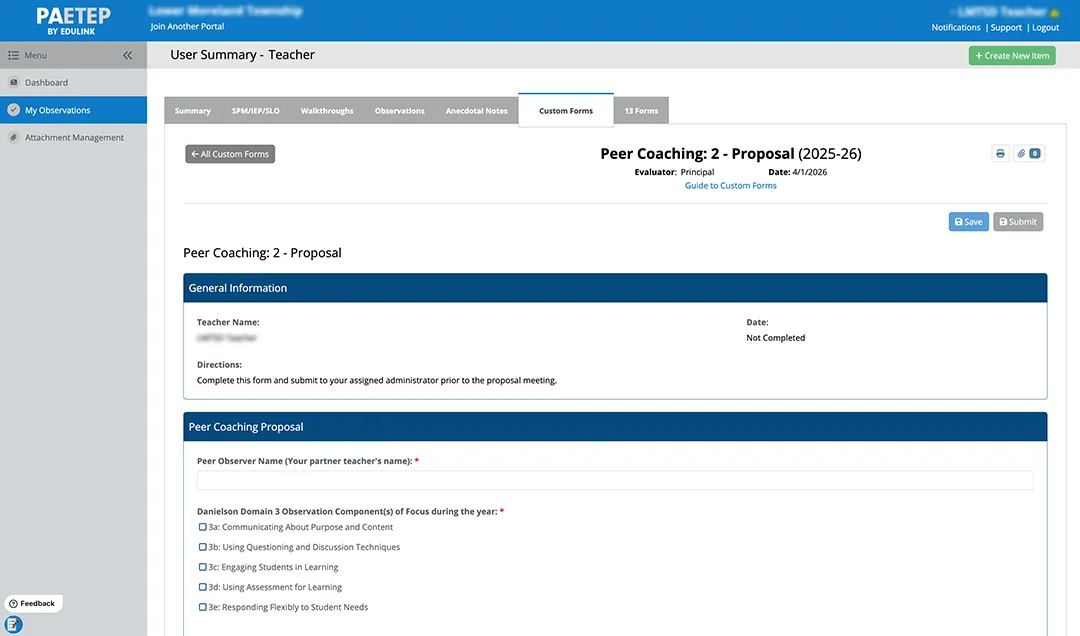
Edulink has launched a new feature within the Custom Forms Module enabling peer-to-peer interactions and coaching. The Custom Supervision feature enables teachers to provide feedback to fellow teachers, coaches to assess other coaches, mentors to support mentees, etc. Explore the potential scenarios for clients utilizing the Custom Supervision feature in PAETEP!
- Teacher to Teacher — Teacher providing feedback to another teacher
- Mentor to Mentee — Mentor teacher providing feedback to another teacher
- Admin to Admin — Superintendent evaluating an assistant superintendent
- Coach to Coach — Head coach or athletic director evaluating another coach
- Para to Para — Lead paraeducator providing feedback to another paraeducator
Learn more about Custom Supervision and how it works with the Custom Forms Module here!
Custom Forms and Support Staff
Districts are enhancing their feedback loops by adding the Custom Forms Module and evaluating all their staff in one place by adding the Support Staff Module. Listed below are examples of custom forms that can be built in PAETEP and the library of support staff evaluation form templates that can be accessed and customized.

Types of Custom Forms that Can Be Built for Educators
Walkthroughs
- Building-Specific ‘Look For’ Forms
- Domain-Specific Walkthroughs
- Component-Specific Walkthroughs
PDE Form 427a and 427b Level I to Level II Certification – Learn more here!
Performance Improvement Plan (PIP)
Surveys
- Teacher Reflections
- Teacher Feedback Forms
- Program Evaluation Forms
Other Types of Forms
- Checklist Observation Forms
- Self-Assessment Forms
Types of Support Staff Templates
- Administrative Assistant Evaluation
- Athletic Director Evaluation
- Business Manager Evaluation
- Clerical Library Aide Evaluation
- Coach Evaluation
- Credential of Competency for Special Ed Paraprofessionals (Check out our blog post to learn more!)
- Custodian / Maintenance Evaluation
- Director of Human Resources Evaluation
- Food Service Evaluation
- Generic Support Staff Evaluation
- Information Technology Evaluation
- Non-Certified School Nurse Evaluation
- Paraprofessional Evaluation
- Personal Care Aide Evaluation
- Security / SRO / School Police Evaluation
- Supervisor of Custodian / Maintenance Evaluation
- Supervisor of Information Technology Evaluation
Explore more about the Custom Forms with Support Staff Module HERE!
We Want Your Feedback!
If you have not yet completed our PAETEP annual satisfaction survey, please consider doing so now. We would love to hear from you. Your feedback is essential for our continuous improvement!
“Great product and amazing customer service!”
– Mark Pontzer, West Chester Area School District
“The Scranton School District is very pleased with our employee evaluation tool, PAETEP. Its efficiency and user-friendly design have provided great value to our district, streamlining the evaluation process and supporting our administrative staff. Additionally, the level of support provided has been consistently strong and responsive to our needs.”
– Robert Gentilezza, Scranton School District
We’d Still Love to Hear from You!
If you missed the chance to provide feedback, you can complete the survey.
PDE Act 13 Office Hours
Remember to attend the PDE-hosted Act 13 Office Hours webinar! The webinars are monthly and aim to address common questions and facilitate interactive discussions about the implementation and processes of Act 13 Educator Effectiveness. All administrators are welcome to attend.
Sessions are held the fourth Thursday of the month from 12 to 1 p.m. virtually via TEAMS.
A * next to a date indicates a change in the typical pattern due to a holiday or vacation.
Remaining 2026 Dates
- 5/28/26
- 6/25/26
Please visit the Educator Effectiveness: Office Hours & Trainings – SAS website for the link to register for office hours.

Latest Comply News & Updates
Tracking Flex Time Just Got Easier with Comply!
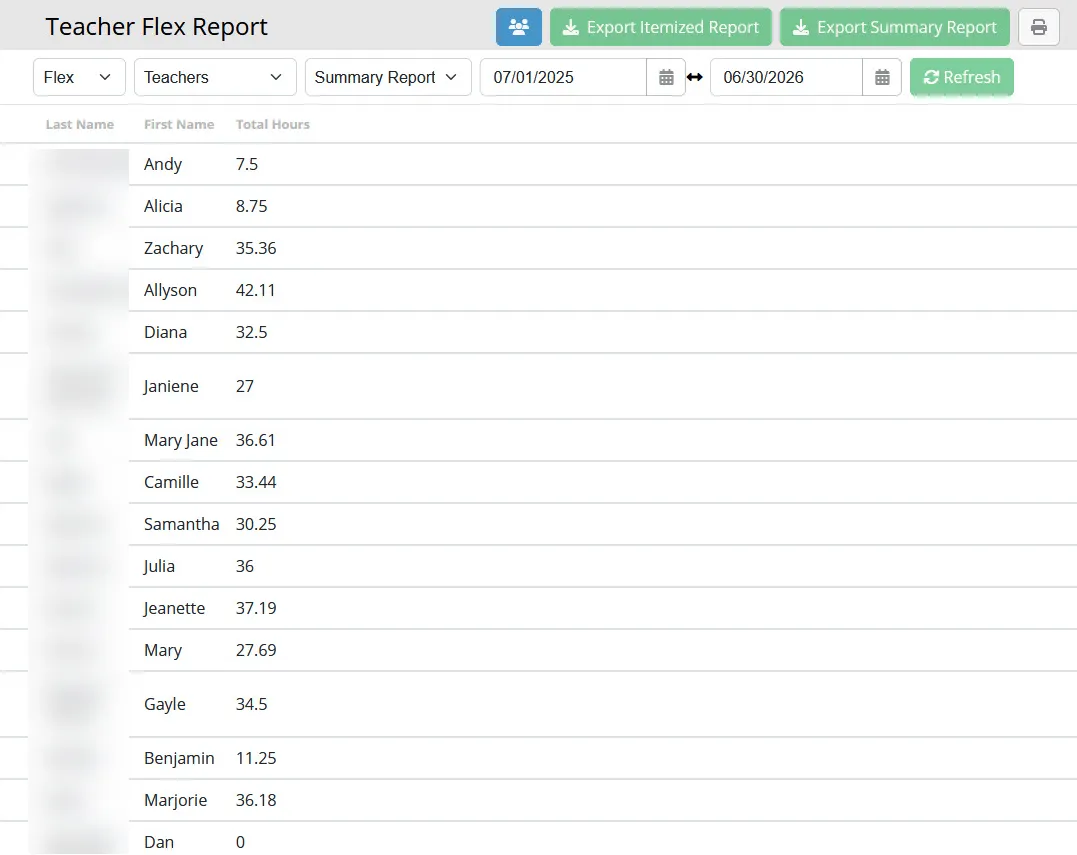
Tracking flex time (Flexible Professional Development Time) just got easier! Edulink’s Comply platform now offers a centralized, automated solution that simplifies and streamlines the management of district-specific professional learning requirements outside of, or in addition to, Act 48.
Many districts use spreadsheets or manual processes to manage flex hours. Comply provides an automated solution for tracking progress toward a required total. Below are some of the highlights related to flex hours that can be tracked in Comply:
- Track flex hours across all staff
- Configure flex hours independently from Act 48
- Maintain documentation and proof of completion
- View live summary reports of flex hours earned
- Export reports for building-level or district-level analysis
Review our support article for more details!
All User Progress for Request Items
The All User Progress feature in Comply, previously available only for Compliance items, is now also accessible for Request items, serving as a broader shared entry point for both compliance and request items.
The Results Are In!
We are pleased to announce the results of our annual feedback survey. Users who responded, are 100% satisfied with Comply!!
“The staff and training that I have received from Comply is one of the best. They are top notch and so easy to work with no matter what you need.”
– Kimberly Bednar, Central Cambria School District
“Thanks for always responding to feedback from your users. We are so impressed with the constant improvement. Comply has been an absolutely incredible and instrumental tool for our district, streamlining our entire approval process. While we initially adopted it for Act 48 credit tracking, we have since expanded its use to include all new hire paperwork, internal requests, and numerous other functions.”
– Stacy Kepner, Lower Moreland Township School District

Your Feedback Matters!
If you missed the chance to provide feedback, we’d still love to hear from you!
The Volunteer Module
Our new Volunteer Management module streamlines volunteer administration by automating requirements and paperwork related to clearances and other district-related items. LEAs can auto-assign compliance items, with recurrence as needed, and access reports on approved volunteers. This module efficiently tracks and manages various volunteer types, including parents, guardians, and coaches. Integrated with Comply, it ensures full compliance with state requirements.
Learn more about this new module or view our demo recording for a quick overview!
Get the Most out of Comply with a Portal Review
Are you fully utilizing Comply? Schedule a portal review with our support team. Click the link below, submit a ticket requesting a portal review, and our team will reach out to schedule a time to review your portal and suggest ways to maximize its features and save you time.
New Client Spotlights
Custom Forms Client Spotlights
PAETEP clients are leveraging the Custom Forms Module to enhance their support staff evaluations and build unique forms for specific needs. Many of these forms have been transformed into templates, providing all districts with innovative and efficient form-building solutions.
Comply Client Spotlights
Each month, we showcase a client’s use of Comply to demonstrate new ways to optimize the platform. Our goal is to help you fully leverage the software, saving time and effort by streamlining district processes.
Explore how Edulink clients are streamlining and managing their administrative workflows. Visit our Client Spotlights web page!

Tyler Technologies Acquires Edulink
Edulink, Inc. has joined the Tyler Technologies team. After more than 25 years of serving Pennsylvania schools, we truly believe this step represents a great day for our team, for our products, and most importantly — for the districts we’re privileged to support.
Edulink has always been built on close, personal partnerships with the districts we serve. And while Tyler Technologies is a much larger organization, we feel the same values and alignment with their team. Joining the Tyler Technologies team allows us to carry our culture forward while gaining access to additional engineering, product, and client experience resources.
As part of the Tyler Technologies team, we will continue focusing on helping administrators reduce burdens and spend more time on meaningful work. You can expect a thoughtful, steady transition with clear communication well in advance of any future updates.